 Aivora
Aivora
Aivora
A custom GPU server builder designs and integrates systems around a workload, rather than simply assembling standard parts. That distinction matters when a team must fit multiple accelerators, high-speed networking, and storage into a limited rack space. It also matters when power draw and heat affect where a server can operate.
Demand is rising, but infrastructure has real limits. The International Energy Agency’s Energy and AI report estimates data centres used about 415 terawatt-hours of electricity in 2024, with consumption potentially reaching around 945 terawatt-hours by 2030. Stanford HAI’s 2025 AI Index reports that training compute for notable AI models has grown rapidly, doubling roughly every five months. These figures help explain why GPU-server decisions now involve more than peak processing speed. Cooling paths, power supplies, network bandwidth, and maintenance access all shape day-to-day performance.
Details count. A poorly matched configuration can leave costly GPUs waiting on data or constrained by heat. A custom GPU server builder helps evaluate those trade-offs, specify compatible components, and plan for deployment and support. Still, customization is not automatically the better choice. Requirements change, and a design that looks ideal on paper may prove awkward in a real rack. The practical question is whether the builder can explain its assumptions, validate the system, and support it after installation.
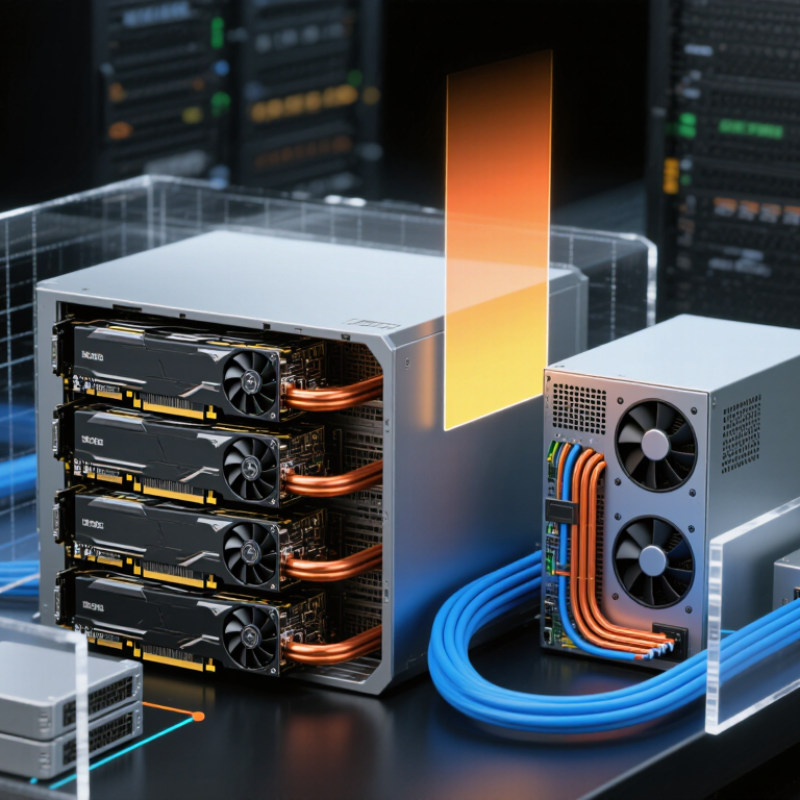
A custom GPU server builder designs and assembles computing systems for demanding workloads. The builder evaluates graphics processors, server chassis, memory, storage, networking, and cooling as one connected system. This role differs from selling standard hardware. It requires translating technical requirements into a reliable machine that can operate under sustained pressure.
A builder may begin with a workload review. Machine learning training needs strong parallel processing and fast data movement. Scientific simulations may require large memory capacity and stable numerical performance. The builder then checks power limits, rack dimensions, airflow, firmware compatibility, and future expansion. A practical design might include redundant power supplies, high-speed storage, and carefully positioned fans. Small details matter. Poor airflow can reduce performance or shorten component life.
Experienced builders also test systems before delivery. They monitor temperature, power consumption, error logs, and performance during extended workloads. Documentation should explain maintenance steps and replacement procedures clearly. However, customization is not automatically better. More components can increase cost, heat, and troubleshooting time. Some early designs may look impressive but fail under real workloads. That is a useful warning. A dependable builder revises the configuration after testing, reports limitations honestly, and avoids promising results that the hardware cannot consistently deliver.
| Dimension | Definition or Configuration Element | Role of a Custom GPU Server Builder | Practical Outcome |
|---|---|---|---|
| Core Definition | A custom GPU server builder designs and configures server systems around a customer’s workload, performance targets, deployment environment, and budget. | Translates technical requirements into a balanced server design rather than relying only on standard, preconfigured systems. | Creates a system that is tailored to the intended workload and operating conditions. |
| Workload Analysis | Typical workloads include artificial intelligence training, machine learning inference, scientific simulation, 3D rendering, video processing, and data analytics. | Evaluates processing patterns, model size, dataset volume, concurrency, latency requirements, and expected utilization. | Helps prevent over-provisioning for light workloads or under-sizing for demanding workloads. |
| GPU Selection | GPU selection depends on memory capacity, memory bandwidth, supported numerical precision, interconnect capability, power consumption, and software compatibility. | Matches GPU characteristics to workload requirements, such as large-memory models, high-throughput training, or low-latency inference. | Improves the likelihood that the GPU resources will be used efficiently. |
| GPU Quantity | A server may be configured with one or multiple GPUs, depending on the required parallelism, model size, and throughput target. | Determines whether a single-GPU, multi-GPU, or distributed architecture is appropriate. | Provides a scalable configuration while considering communication overhead between GPUs. |
| CPU and Memory Balance | The host CPU, system memory, and memory bandwidth must support data preparation, job scheduling, storage transfers, and GPU feeding. | Balances CPU cores, system RAM, and GPU resources so that the host system does not become a bottleneck. | Supports steadier GPU utilization and smoother execution of data-intensive workloads. |
| PCIe and Expansion | GPU servers require suitable expansion slots, lane allocation, physical spacing, and platform support for the selected accelerators. | Checks slot layout, PCIe generation, lane availability, risers, and clearance before finalizing the chassis and motherboard. | Reduces installation conflicts and preserves future expansion options. |
| GPU Interconnect | Multi-GPU workloads may benefit from high-speed GPU-to-GPU communication, depending on the application and software framework. | Assesses whether the workload requires direct GPU communication or can operate effectively through the host system. | Aligns interconnect design with actual communication requirements instead of adding unnecessary complexity. |
| Thermal Design | High-performance GPUs can generate substantial heat and require adequate airflow, heatsinks, fans, and chassis space. | Designs airflow paths, cooling capacity, fan control, and component placement for sustained operation. | Helps maintain stable performance and reduces the risk of thermal throttling. |
| Power Delivery | The power supply must support the combined load of GPUs, CPUs, memory, storage, fans, and other components, including transient demand. | Calculates expected consumption, selects suitable power capacity, and verifies connector and redundancy requirements. | Improves system stability and leaves an appropriate operational margin. |
| Storage Architecture | Storage may include fast local devices for operating systems, applications, datasets, scratch space, and checkpoint files. | Chooses storage capacity, performance, redundancy, and data paths based on dataset size and access patterns. | Reduces data-loading delays and supports reliable handling of large working files. |
| Networking | Network requirements vary according to shared storage, cluster communication, remote access, and data-transfer volume. | Specifies network speed, interface count, latency expectations, and compatibility with the existing infrastructure. | Helps prevent network transfers from limiting overall application performance. |
| Operating Environment | GPU servers may operate in data centers, laboratories, offices, edge locations, or private infrastructure environments. | Adapts the design to rack space, acoustics, ambient temperature, power availability, physical access, and security requirements. | Produces a configuration that is practical for the intended deployment location. |
| Software Compatibility | GPU workloads depend on operating systems, drivers, compute libraries, container runtimes, orchestration tools, and application frameworks. | Verifies that the selected hardware can support the required software stack and planned deployment method. | Reduces compatibility issues during installation and production use. |
| Reliability Features | Reliability may involve redundant power supplies, error-correcting memory, validated components, monitoring, and replaceable parts. | Prioritizes reliability features according to uptime objectives, workload criticality, and maintenance procedures. | Supports more predictable operation and simpler service management. |
| Validation and Testing | Validation can include hardware diagnostics, thermal tests, stress tests, driver checks, benchmark runs, and workload-specific trials. | Tests the completed configuration before delivery or deployment and documents observed behavior. | Identifies configuration problems before the server enters regular service. |
| Scalability | Scalability refers to the ability to add resources or connect additional systems as demand increases. | Plans expansion paths for GPUs, memory, storage, networking, and cluster integration where technically feasible. | Extends the useful life of the infrastructure and supports phased investment. |
| Total Cost of Ownership | Total cost includes acquisition, electricity, cooling, software, maintenance, support, facility requirements, and eventual replacement. | Compares performance, energy use, serviceability, and lifecycle costs instead of focusing only on purchase price. | Enables a more informed decision based on long-term operational value. |
| Post-Build Support | Support may cover installation guidance, firmware and driver updates, troubleshooting, component replacement, and system optimization. | Provides documentation and technical assistance throughout deployment and ongoing operation. | Shortens recovery time and helps maintain consistent system performance. |
Design begins with workload analysis. Engineers estimate model size, memory needs, training time, and user traffic. Parts come later. The system must fit the work, not just the chassis.
The answer depends on memory demand, processing needs, and expected workload duration. More GPUs also increase power use, heat, and cooling requirements. More is not always better.
The CPU supplies data to the GPUs. Limited memory bandwidth or PCIe lanes can leave expensive GPUs waiting. That wastes performance. A balanced platform works harder.
Engineers map airflow before installation. They check fan paths, card spacing, air intake, and exhaust routes. A blocked intake can create a hotspot quickly. Heat is relentless.
Power supplies and circuits must support sustained workloads. Engineers measure real power draw, not only short benchmark results. An undersized circuit can stop a capable server.
Fast system memory, low-latency storage, and suitable network adapters keep data moving. Storage layout also matters. Slow data delivery can make powerful GPUs wait.
Technicians test GPU communication, memory stability, storage speed, temperatures, and power behavior. They inspect logs under load. Firmware updates are included. Testing reveals uncomfortable details.
The first layout is rarely perfect. A cable may block a fan, or a sensor may find an unexpected hotspot. Good teams revise the design. Some compromise may remain.
Liquid cooling can help dense configurations manage heat. However, it adds plumbing, maintenance, and possible service complexity. Air cooling may be simpler. The choice needs honest evaluation.
Teams should record power draw, temperatures, compatibility checks, and design changes. Clear maintenance instructions help operators respond faster. Missing notes become future problems. That part is easy to underestimate.
A custom gpu server builder is a specialized provider that designs and assembles GPU-powered servers to match the performance, capacity, and budget requirements of a specific organization. Instead of offering only fixed configurations, the builder evaluates the intended workload and selects a suitable combination of GPUs, processors, memory, storage, networking, power supplies, and cooling systems. The result is a purpose-built platform that can be optimized for efficiency, scalability, and long-term maintenance.
Custom GPU servers support demanding workloads such as artificial intelligence training, machine learning inference, scientific computing, 3D rendering, data analysis, and virtualized graphics applications. When choosing a builder, organizations should consider technical expertise, component compatibility, system reliability, thermal design, upgrade flexibility, testing procedures, warranty coverage, delivery capability, and after-sales support. A strong builder should also provide clear configuration guidance and help ensure that the final system aligns with current needs while leaving room for future expansion.
